
Contract Manufacturing for Injection Molded Plastic Products in North America
(800) 824.0607
Why Do You Need an Ethernet Gateway for Your Network?
Modern networks rarely serve one device type or one traffic pattern. A factory may connect sensors, cameras, controllers, laptops, and cloud services through the same infrastructure. An Ethernet Gateway helps these systems communicate when their protocols, speeds, or security requirements differ. It can translate traffic, manage routes, and create a controlled bridge between local Ethernet devices and external networks.
The scale is substantial. Cisco’s Annual Internet Report projected 5.3 billion internet users and 29.3 billion connected devices by 2023. More endpoints create more paths to manage. They also create more opportunities for delay, misconfiguration, and unauthorized access. A gateway can centralize access rules, isolate sensitive equipment, and provide clearer visibility into network traffic. That matters when a technician is troubleshooting a controller beside a noisy production line.
Bob Metcalfe, Ethernet co-inventor, once described Ethernet as “the plumbing of the Internet.” The comparison remains useful. Good plumbing is mostly invisible, but failures become obvious quickly. An Ethernet Gateway is not a cure-all. Poor cabling, weak passwords, and outdated firmware can still undermine a reliable design. That limitation deserves attention.
Industry guidance from the Ethernet Alliance and NIST’s network security publications also emphasizes interoperability, segmentation, and disciplined management. In practice, the right gateway depends on bandwidth, protocols, latency, environmental conditions, and future expansion. A small office may need basic routing. A plant may require industrial protocols, redundant links, and secure remote access. The decision is technical, but its impact is concrete: fewer blind spots, cleaner traffic flows, and faster recovery when something breaks.
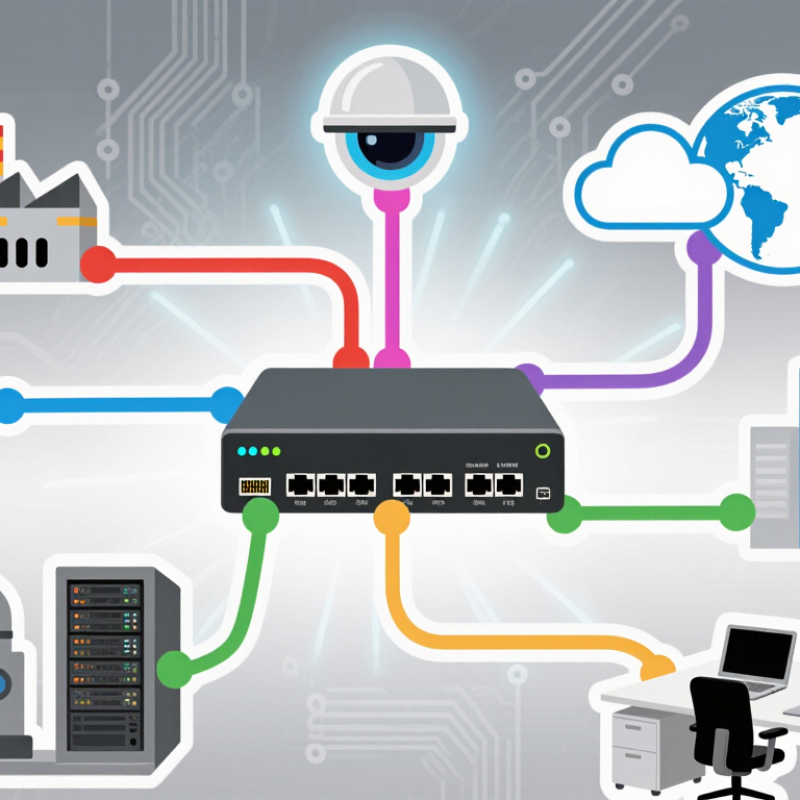
An Ethernet gateway is the network’s translator and traffic controller. It connects a local Ethernet network to another network, often the internet. On one side, it receives Ethernet frames from computers, cameras, or sensors. On the other side, it sends IP packets toward their destination. When a device needs an external website, it sends the request to its default gateway. The gateway checks the destination, chooses a route, and forwards the packet. It also returns the response to the correct device.
This work happens quickly, but several functions may operate together. A gateway can assign local IP addresses through DHCP. It can translate private addresses with NAT. It may also filter unwanted traffic through firewall rules. In a small office, this means a laptop can reach a cloud service without needing a public address. The gateway keeps internal devices organized behind one controlled connection. That separation improves manageability and can reduce unnecessary exposure.
Physical details matter. A damaged cable, weak power supply, or incorrect port setting can make a healthy network appear broken. Troubleshooting usually starts with link lights, IP settings, gateway reachability, and event logs. A gateway can still become a bottleneck when too many devices share limited processing capacity. Security rules also need regular review. A rule that worked last year may now create an unnoticed weakness. Good configuration is important, but it is not permanent.
Why Do You Need an Ethernet Gateway for Your Network?
An Ethernet gateway connects networks that use different address ranges, rules, or physical segments. In a small office, computers may use one local subnet, while cameras or industrial devices use another. The gateway receives an Ethernet frame, examines its destination IP address, and forwards the packet through the correct interface. It acts like a controlled crossing point.
For example, a workstation might send data from 192.168.10.25 to a device on 192.168.20.40. The gateway checks its routing table and sends the packet toward the second network. It can also translate addresses, separate VLANs, and apply access rules. Proper configuration matters. A wrong subnet mask can make a healthy cable appear useless.
I have seen gateways solve communication problems that basic switches could not. However, they do not repair every network fault. Slow links, damaged connectors, and incorrect device settings still require testing. Good practice includes documenting interfaces, checking logs, and verifying routes with controlled tests. The process is rarely perfect. Sometimes an old rule remains unnoticed until a new network is added. Secure gateways should limit unnecessary traffic and use strong administrative controls. Engineers should review these settings regularly, because network requirements change faster than many diagrams do.
| Network Dimension | What an Ethernet Gateway Provides | How It Connects Different Networks |
|---|---|---|
| Primary Purpose | Acts as an entry and exit point between separate networks. | It forwards traffic from a local Ethernet network to another network, such as a routed enterprise network, service-provider network, or the public Internet. |
| Network Layer | Usually operates at Layer 3 of the OSI model, although some gateway devices also provide Layer 2 switching functions. | It examines IP addresses and selects an appropriate next hop instead of forwarding traffic only by local Ethernet hardware addresses. |
| Address Translation | Can translate private internal addresses to a shared public address through Network Address Translation (NAT). | NAT allows devices using private IPv4 address ranges to communicate with external networks while reducing the need for a unique public IPv4 address for every device. |
| Routing | Maintains routes to directly connected networks and may use static or dynamic routing information. | When a destination is outside the local subnet, the gateway uses its routing table to send the packet toward the correct remote network. |
| Default Gateway | Provides a default route for hosts that do not have a more specific route. | Computers send off-subnet traffic to the default gateway, which then forwards it toward the destination network. |
| Ethernet Connectivity | Uses copper or fiber Ethernet interfaces, depending on the network design and hardware configuration. | Each interface can connect to a different Ethernet segment, allowing traffic to move between physically or logically separated network areas. |
| IP Subnet Separation | Supports communication between different IP subnets. | Because routers separate broadcast domains, a gateway can connect subnets with different network prefixes while controlling how traffic passes between them. |
| VLAN Connectivity | Can route traffic between VLANs when configured with appropriate interfaces or tagged links. | Inter-VLAN routing enables devices in separate logical networks to communicate according to defined routing and security policies. |
| Protocol Handling | Forwards standard IP traffic and may support services such as DHCP relay, DNS forwarding, or VPN tunneling. | These functions help devices on one network obtain configuration services or reach resources located on another network. |
| Security Control | May include packet filtering, access control lists, stateful firewall functions, and traffic logging. | The gateway can permit or deny traffic based on source, destination, protocol, port, interface, or connection state before forwarding it. |
| Broadcast Management | Separates broadcast domains between IP networks. | Broadcast frames normally remain within their local Layer 2 network, reducing unnecessary traffic across other subnets. |
| Traffic Direction | Supports bidirectional traffic forwarding between connected networks. | It can carry outbound requests from internal devices and return responses from remote networks, subject to routing and security rules. |
| IPv4 and IPv6 Support | Can be designed to support IPv4, IPv6, or dual-stack operation. | Dual-stack gateways allow IPv4 and IPv6 networks to operate through the same infrastructure while each protocol follows its own addressing and routing rules. |
| Performance Factors | Performance depends on interface speed, packet-processing capacity, routing features, encryption workload, and traffic volume. | A properly sized gateway reduces bottlenecks when connecting multiple networks and maintains predictable forwarding performance under normal load. |
| Reliability | Can support redundant links, multiple gateways, and automatic failover mechanisms. | Redundancy allows traffic to use an alternate path or gateway when a primary connection or device becomes unavailable. |
| Typical Use Cases | Commonly used for office Internet access, branch connectivity, data-center segmentation, industrial networks, and remote access. | In each case, the gateway provides the controlled boundary through which traffic travels between local Ethernet devices and other network domains. |
| Why It Is Needed | Local switches connect devices within the same network, but they generally do not replace a routed gateway for different IP networks. | An Ethernet gateway provides the addressing, routing, policy enforcement, and protocol functions required for reliable communication beyond the local subnet. |
An Ethernet gateway solves a practical network problem: different devices often speak different protocols. It translates traffic between Ethernet, serial links, industrial buses, and cloud services. This allows older sensors, meters, and controllers to communicate without replacing every device. That matters.
It also separates network zones. A gateway can place operational equipment behind controlled interfaces, limiting unnecessary traffic and reducing exposure. The 2024 Data Breach Investigations Report analyzed 30,458 security incidents and found that human involvement appeared in 68% of breaches. A gateway cannot stop every mistake, but access rules, logging, and segmented connections can reduce the damage caused by one compromised account or device.
Reliability is another concern. Uptime Institute’s 2024 Global Data Center Survey reported that 53% of respondents experienced an outage during the previous three years. Gateways can monitor link status, buffer messages, and redirect selected traffic when a connection fails. In real installations, however, poor placement or weak configuration can create another failure point. I have seen networks with expensive monitoring tools but no clear gateway ownership. The hardware was present. The visibility was not. A useful gateway needs updated firmware, tested failover, accurate time settings, and documented rules that technicians can understand during a stressful outage.
An Ethernet gateway connects devices that use different network protocols, but its value depends on practical features. In field installations, protocol compatibility is the first checkpoint. Confirm support for the devices already operating on your network. A gateway that lacks one required protocol can create expensive workarounds.
Throughput matters too. Check packet capacity, port speed, and latency under real traffic, not only ideal laboratory conditions. Industrial sites may send sensor data, alarms, and control messages simultaneously. Sufficient memory helps prevent dropped packets during traffic bursts. It is easy to overlook this detail.
Security features deserve equal attention. Look for encrypted management access, user permissions, firewall functions, secure updates, and event logs. Clear diagnostics can reduce troubleshooting time when a machine stops communicating. Remote monitoring is useful, but it should include access controls and audit records. Convenience without control can become a weakness.
Physical design also affects reliability. Choose suitable protection against dust, vibration, temperature changes, and unstable power. Redundant power inputs and automatic recovery can keep essential connections available. During a small network test, engineers should measure restart time and recovery behavior, not just normal performance. I have seen specifications look impressive while installation details remained unclear. That is a warning sign. Check connector types, mounting space, configuration tools, and future expansion before purchase. The best choice is not always the fastest gateway; it is the one technicians can understand, secure, and maintain under pressure.
An Ethernet gateway can make network management more visible and controlled. It connects local Ethernet devices with wider networks while applying defined traffic rules. In a small office, one gateway can manage computers, cameras, printers, and industrial sensors from a central interface. Administrators can assign IP addresses, separate devices with VLANs, and monitor bandwidth without checking every cable manually.
Visibility changes everything. Live traffic charts can reveal a failing access point or an unusual upload before users report problems. Event logs record connection attempts, address changes, and firewall actions. These records support troubleshooting and regular security reviews. A technician can compare today’s packet loss with last week’s readings, then test the cable, port, or upstream connection. This approach is more reliable than guessing.
An Ethernet gateway also supports controlled remote management, scheduled updates, and backup configurations. Access should use strong authentication and limited permissions. Not always. Poor settings can create delays, block legitimate services, or produce too many alerts. I have found that simple policies are easier to verify than complicated rule sets. Managers should review unused ports, confirm time synchronization, and test recovery procedures periodically. Small details matter. A gateway improves management when its logs are read, its rules are reviewed, and its performance is measured against real workplace needs.